

所需依赖
暂无
后端代码
根据数据库结构自己写吧,研究一下逻辑就行,很简单。
我贴一个简单的版本对比工具类代码,只是能够实现我自己的需求,不一定适用于你们
// CompareVersion 比较两个版本号大小
// 返回值:
//
//	-1: v1 < v2
//	 0: v1 == v2
//	 1: v1 > v2
func CompareVersion(v1, v2 string) int {
	s1 := strings.Split(v1, ".")
	s2 := strings.Split(v2, ".")

	// 取最长长度
	maxLen := len(s1)
	if len(s2) > maxLen {
		maxLen = len(s2)
	}

	// 循环比较每段数字
	for i := 0; i < maxLen; i++ {
		var n1, n2 int

		if i < len(s1) {
			n1, _ = strconv.Atoi(s1[i])
		}
		if i < len(s2) {
			n2, _ = strconv.Atoi(s2[i])
		}

		if n1 > n2 {
			return 1
		}
		if n1 < n2 {
			return -1
		}
	}

	return 0
}
数据库结构
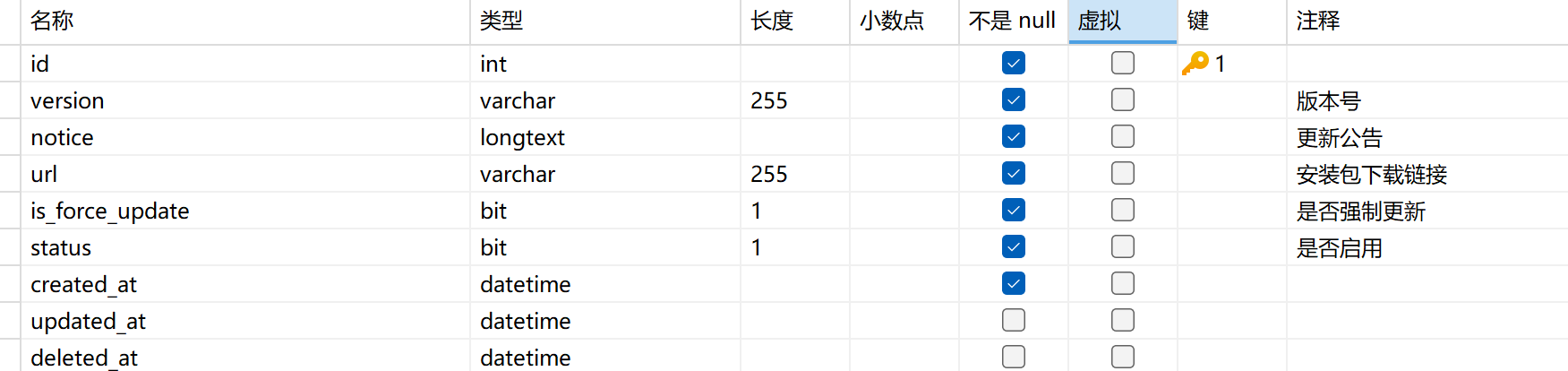
前端完整代码
commponents/AppUpdate/Appupdate.vue
<template>
	<view class="ComponentMain" v-if="state.show">
		<view class="modal">
			<img src="../../assets/update.png"
				mode="widthFix" />
			<view class="val">
				<!-- <view class="title">{{ state.data.name || '新版本发布' }}</view> -->
				<scroll-view :scroll-top="scrollTop" class="tip" scroll-y="true" @scrolltoupper="upper"
					@scrolltolower="lower" @scroll="scroll" show-scrollbar="true">
					<uv-parse :content="state.data.notice"></uv-parse>
				</scroll-view>

				<view class="progress-container" v-if="state.isShowProgress">
					<view class="progress-box">
						<view class="text">安装包下载中,请稍后......</view>
						<uv-line-progress :percentage="state.progress"></uv-line-progress>
					</view>
				</view>

				<view class="btnGroup" v-if="!state.isShowProgress">
					<view v-if="!state.data.isForceUpdate" class="cancle" @click="cancel">下次一定</view>
					<view class="update" @click="downloadFile">立即更新</view>
				</view>
			</view>
		</view>
	</view>
</template>

<script setup>
	import {
		updateStore
	} from '@/stores/updateStores.js'
	import {
		toRefs,
		ref,
	} from 'vue'

	const state = updateStore
	const scrollTop = ref(0)

	// 取消(普通更新可关闭,强制更新可以判断阻止关闭)
	function cancel() {
		if (state.data.isForceUpdate) {
			// 强制更新,不允许关闭(可提示或直接返回)
			uni.showToast({
				icon: 'none',
				title: '此版本为强制更新,请立即更新'
			})
			return
		}
		state.show = false
	}

	// 下载并安装(示例为安卓 apk 打开/保存逻辑,App 环境生效)
	function downloadFile() {
		if (!state.data.url) {
			uni.showToast({
				icon: 'none',
				title: '无效的下载地址'
			})
			return
		}

		state.isShowProgress = true
		state.progress = 0

		const downloadTask = uni.downloadFile({
			url: state.data.url,
			success: (res) => {
				if (res.statusCode === 200) {
					// 安卓:保存并安装;iOS AppStore 流程不同(请按平台处理)
					uni.saveFile({
						tempFilePath: res.tempFilePath,
						success: (saveRes) => {
							state.isShowProgress = false
							// 打开安装包或文档(示例)
							uni.openDocument({
								filePath: saveRes.savedFilePath,
								success() {
									// 安装后退出 app(或按需处理)
									uni.exit()
								}
							})
						},
						fail(err) {
							state.isShowProgress = false
							uni.showToast({
								icon: 'none',
								title: '保存失败'
							})
							console.error('saveFile err', err)
						}
					})
				} else {
					state.isShowProgress = false
					uni.showToast({
						icon: 'none',
						title: '下载失败'
					})
				}
			},
			fail(err) {
				state.isShowProgress = false
				uni.showToast({
					icon: 'none',
					title: '下载失败'
				})
				console.error('downloadFile fail', err)
			}
		})

		downloadTask.onProgressUpdate((res) => {
			state.isShowProgress = true
			state.progress = res.progress
			// 你可以打印进度: console.log(res)
		})
	}
</script>
<style lang="less" scoped>
	.ComponentMain {
		width: 100vw;
		height: 100vh;
		background-color: #00000090;
		position: fixed;
		top: 0;
		left: 0;
		display: flex;
		justify-content: center;
		align-items: center;

		.modal {
			border-radius: 10px;
			width: 300px;
			background-color: white;

			img {
				width: 100%;
				margin-top: -70px;
				margin-bottom: -20px;
			}

			.val {
				padding: 10px;
				padding-top: 0;

				.title {
					font-size: 20px;
				}

				.tip {
					// margin: 20px 0;
					font-size: 14px;
					max-height: 35vh;
				}

				.progress-container {
					width: 280px;
					display: flex;
					align-items: center;
					justify-content: center;

					.progress-box {
						width: 100%;
						padding: 10px;
						background: #ffffff;
						border-radius: 20rpx;

						.text {
							margin-bottom: 20rpx;
						}
					}
				}
			}

			.btnGroup {
				margin-top: 20px;
				display: flex;
				flex-direction: row;
				gap: 5%;

				.cancle {
					padding: 10px;
					text-align: center;
					width: 45%;
					border-radius: 5px;
					background-color: #e5e5e5;
					color: black;
					font-size: 15px;
				}

				.update {
					padding: 10px;
					text-align: center;
					width: 100%;
					background-color: #feaa00;
					border-radius: 5px;
					color: white;
					font-size: 15px;
				}
			}
		}
	}
</style>
stores/UpdateStores.js`
// src/stores/updateStore.js
import {
	reactive
} from 'vue'

export const updateStore = reactive({
	show: false,
	data: {
		name: '',//版本名称
		notice: '',//版本介绍
		url: '',//下载地址
		isForceUpdate: false,//是否强制更新
		version: ''//版本号
	},
	isShowProgress: false,
	progress: 0
})
使用方法(示例)
pages/index/index.vue
<template>
    <!-- 正常代码 -->
	<AppUpdate />
</template>
utils/config.js
export const AppVersion = "1.0.4"utils/appUpdate.js
import {
	AppVersion
} from "@/config"
import {
	AppVersionUpdateInspect
} from "@/api"
// 检查版本更新
export function VersionInspect() {
    // 请求接口 传递当前版本号
	AppVersionUpdateInspect(AppVersion).then(res => {
		if (res.code == 0) {
            // 若需要更新则接口返回的needUpdate为true,反之亦然
			if (res.data.needUpdate) {
				updateStore.show = res.data.needUpdate
				updateStore.data = res.data
			}
		}
	})
}
App.vue
<script>
	import {
		VersionInspect
	} from '@/utils/appUpdate';
	export default {
		onLaunch: function() {
            VersionInspect();
		},
		onShow: function() {
		},
		onHide: function() {
		},
		methods: {}
	}
</script>
效果
强制更新

非强制更新